A website form submission should be the start of a clear follow-up process.
But for many small teams, it becomes the point where the lead starts to disappear. The lead fills out a form, a notification lands in an inbox, someone sees it, someone assumes another person will reply, and a few days pass.
Then the lead goes cold.
This usually does not happen because the team is careless. It happens because the workflow after form submission is unclear.
The fix is not always a full CRM. The fix is a clearer workflow: Capture → Assign → Follow up → Track.
Quick summary
- A website form submission should start a clear follow-up process, not become another inbox notification.
- Leads go cold when ownership, timing, lead source, opt-outs, and activity history are scattered across tools.
- The problem is usually the handoff after submit, not the form itself.
- Small teams can fix the basics with a simple workflow: Capture, Assign, Follow up, and Track.
- A lightweight workspace helps when a shared inbox and spreadsheet no longer make the next step visible.
The form did its job. The workflow did not.
Most website forms are built to collect information: name, email, company, message, maybe a phone number, maybe a permission checkbox, and maybe a lead source.
That is useful, but collecting the lead is only step one. The real question is what happens next.
A consultant receives a contact page form. An agency receives a pricing request from a campaign landing page. A freelancer receives a project inquiry through a portfolio form. A B2B team receives a demo request from a guide page.
In each case, the lead has shown intent. If the next step is unclear, that intent fades.
Why leads go cold after form submissions
Leads usually go cold because the handoff between form submission and follow-up is weak.
No one clearly owns the lead
The lead goes to a shared inbox, several people can see it, nobody is assigned, and everyone assumes someone else will reply.
The lead source is ignored
Pricing requests, demo forms, guide downloads, referrals, and support questions all need different follow-up context.
Follow-up happens too late
When nobody owns the lead, the reply waits behind meetings, inbox noise, spreadsheet updates, and chat messages.
The first reply is too generic
A vague "we will get back to you soon" message does not use the context the person already shared in the form.
Follow-up depends on memory
Manual follow-up can work at low volume, but memory breaks when the team needs to remember who replied, what was sent, and what should happen next.
Opt-outs are not visible
Permission-based follow-up needs visible opt-outs so the team can avoid continuing follow-up when someone has opted out.
There is no activity history
If the team cannot see source, owner, messages, replies, reassignment, and next action, context disappears and momentum slows.
If the biggest issue is ownership, this guide on how to assign lead ownership in a small team goes deeper on owner rules and handoffs.
Common signs your form lead process is breaking
Your process may be too fragile if the team keeps asking:
- Did anyone reply to this lead?
- Who owns this one?
- Where did this lead come from?
- Was this from the pricing page or the contact page?
- Did we already follow up?
- What did we send?
- Did they respond?
- Are they still okay to contact?
- Why is this lead in the spreadsheet but not in the inbox?
- Can someone else take over?
These questions are not bad. But if your team asks them repeatedly, the workflow is not visible enough.
How to see where follow-up needs attention
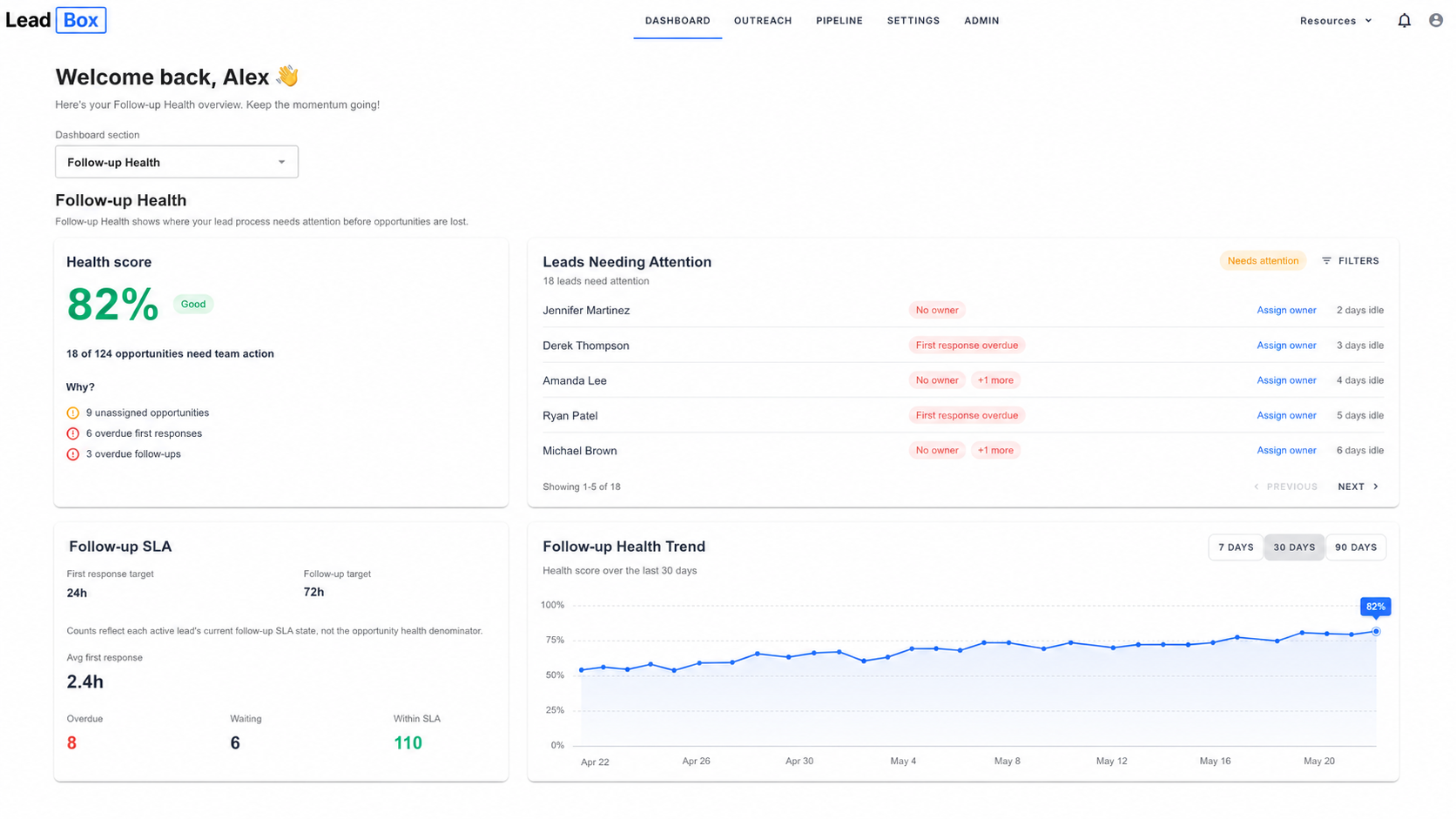
Once the basic workflow exists, the next problem is visibility. A lead can be captured and still sit without an owner. A reply can arrive and still wait too long for the team. A next action can exist and still be overdue or assigned to someone who is no longer active.
The useful question is not only whether a record changed recently. It is whether the team needs to act now, or whether the next move belongs to the prospect.
No owner
The opportunity does not have a clear responsible person.
First response overdue
A new inbound lead has exceeded the workspace's expected first-response window.
Follow-up overdue
The prospect has responded and the team's next response is overdue.
Missing next action
An eligible active lead does not have an open Next Action recorded.
Overdue next action
The current Next Action due date or time has passed under the workspace-timezone rules.
Requires reassignment
The Next Action still exists, but its assignee is no longer eligible and an active member must take ownership.
Waiting for prospect
The team has acted and the next move belongs to the prospect; this should not automatically be treated as a failure.
What Follow-up Health™ adds
Follow-up Health™ brings supported ownership, response-time, SLA and Next Action signals into one attention view on the LeadBox dashboard. Instead of reviewing every lead one by one, the team can see where follow-up needs attention, open the related lead, and take the appropriate next step.
Health score
A summary of supported follow-up conditions across the workspace.
Follow-up SLA
Shows whether team action is overdue, approaching the expected window, waiting for the prospect, or currently healthy where supported.
Trend views
7, 30 and 90-day views where available help show whether the follow-up process is improving or slipping over time.
A practical review workflow
- Review Follow-up Health on the Dashboard.
- Open the leads needing attention.
- Read the reason shown for the lead.
- Open the related lead in Pipeline.
- Assign an owner, add, reschedule, reassign or complete the Next Action, or record the required follow-up as appropriate.
- Return to Follow-up Health and refresh when needed.
Follow-up Health is an operational attention view. The score is not a sales forecast, a quality grade for an individual team member, or a guarantee that a lead will reply, be recovered, convert, or generate revenue.
A practical workflow to stop leads going cold
You can fix most form follow-up problems with a simple structure: Capture → Assign → Follow up → Track.
The broader lead follow-up workflow for small teams uses the same foundation for statuses, next steps, and history.
Simple workflow
1. Capture the lead with useful context
Do not only capture the email address. Capture the context that helps your team decide what should happen next.
- name
- company
- message
- lead source
- form name
- submission date
- permission or consent fields, where relevant
- opt-out status, when available
- current status
Example lead record
Name: Emma. Company: Northline Studio. Source: Pricing page form. Message: "We need a better way to follow up on inbound leads." Status: New. Owner: Unassigned. Opt-out status: Not opted out.
2. Assign one clear owner
Every lead should have one owner. The owner is responsible for the next action, even if other people help.
That action could be:
- reply to the lead
- qualify the request
- ask a clarifying question
- book a meeting
- reassign the lead
- stop follow-up
- update the lead status
Start with simple ownership rules:
- Pricing page form -> founder or sales owner
- Demo request -> sales owner
- Existing customer inquiry -> account owner
- Technical question -> consultant
- General contact form -> weekly lead owner
- Guide download -> campaign owner, if permission-based follow-up applies
3. Follow up based on the lead source
Good follow-up should match the situation. A demo request should get a different reply than a guide download. A person who opted out should not continue receiving follow-up.
Useful follow-up is usually short and specific: thank them, mention the context, ask one useful question, suggest the next step, and make it easy to reply.
The webform to email follow-up guide covers this path in more detail. For a practical distinction between inbound follow-up and cold outreach, read the permission-based follow-up guide.
4. Track the next action
The lead should always have a visible status. You do not need a complex pipeline to start, just a way to see whether the lead is still waiting for action.
Checklist: how to prevent form leads going cold
Use this checklist for every website form lead:
- Was the lead captured in one place?
- Is the lead source visible?
- Is there one clear owner?
- Has the owner replied?
- Was the reply based on the form context?
- Is the opt-out status visible?
- Is the current status updated?
- Is there a next action?
- Can another team member see the activity history?
- Can the lead be followed up without searching inboxes and chat?
If several answers are no, the lead may not go cold because of demand. It may go cold because the workflow is unclear.
When simple tools are enough
You may not need a dedicated workspace yet. Simple tools can be enough if:
- You receive only a few form submissions each month.
- One person handles every lead.
- You do not run campaigns.
- You do not need structured permission-based follow-up.
- You rarely reassign leads.
- You can easily see the full history in one place.
- You do not need to track multiple lead sources.
At this stage, a shared inbox and spreadsheet may work. But each lead still needs one place to live, one owner, one next action, and one visible status.
For a fuller setup, see how to manage website contact form leads without a CRM .
When a dedicated workspace helps
A lightweight workspace starts to help when the follow-up process involves more people, more sources, or more handoffs.
- You receive leads from several website forms.
- You run content, campaigns, or landing pages.
- More than one person replies to leads.
- You need to assign ownership.
- You need opt-outs to be visible.
- You want permission-based follow-up templates.
- You need activity history across the team.
- You want to trigger next actions when a lead is created or updated.
This is the gap many small teams fall into. A full CRM feels too heavy. A spreadsheet feels too manual. An inbox hides too much context.
If your team is a small agency, the lead follow-up for small agencies solution applies the same workflow to agency lead handoffs.
How LeadBox helps
LeadBox is built for the workflow after someone submits a form or shows interest.
It helps small teams manage Capture → Assign → Follow up → Track.
With LeadBox, your team can capture webform leads, keep lead sources visible, assign clear ownership, send permission-based follow-up, trigger next actions, and keep activity history visible in one lightweight workspace.
That helps answer the questions that usually slow teams down:
- Who owns this lead?
- Where did it come from?
- Has anyone replied?
- What was sent?
- Did the person respond?
- Did they opt out?
- What should happen next?
LeadBox is not a cold outreach tool. It is not an all-in-one CRM platform. It is a focused lead follow-up workspace for small teams that want fewer leads to disappear after form submission.
Example: why a lead goes cold
Before
A potential client fills out a contact form. The notification goes to a shared inbox. The founder sees it but is busy. A consultant assumes the founder will reply. The lead is added to a spreadsheet later. No owner is assigned, no follow-up reminder is created, and the lead is forgotten for four days.
After
The lead is captured in one workspace, the lead source is visible, the lead is assigned to one owner, a relevant permission-based reply is sent, the activity history is updated, and the next action is visible.
Bottom line
Leads go cold after website form submissions when the next step is unclear.
The form may work perfectly. But if ownership, follow-up, lead sources, opt-outs, and activity history are scattered, the team will lose momentum.
Start with a simple workflow: capture the lead, assign one owner, follow up with context, and track what happened.
You can keep reading practical workflow articles in LeadBox guides .